
AI text remover
Remove Text from Image, Keep the Background
Upload an image, choose all text or only the words you list, and AI erases them and fills the space with the surface around them, so the picture looks as if the text was never there. Your first edit is free; after that an edit is $0.50.
Remove the words, keep the photo
First edit free · then $0.50 an edit · no subscription
Upload an image with text on it to start, or try the sample chalkboard.
Each edit: 125 credits ($0.50) · first edit free · $5 buys 10, no subscription
Example: All text removed
Real result · drag to compare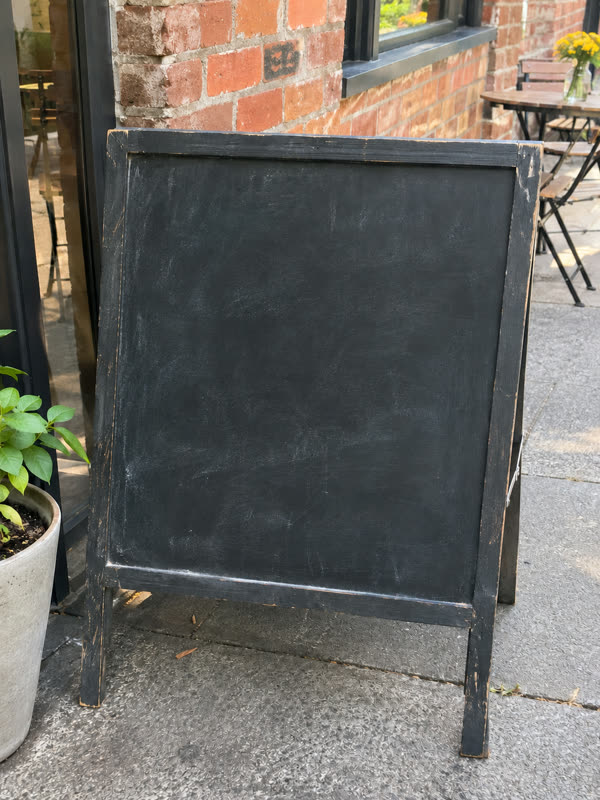
 BeforeAfter
Real results, not mock-ups
Remove text from image: before and after
Drag across each picture to compare. These are unretouched results from the model the editor uses, at the same size as the image that went in.
- BeforeAfter
All the writing off a chalkboard
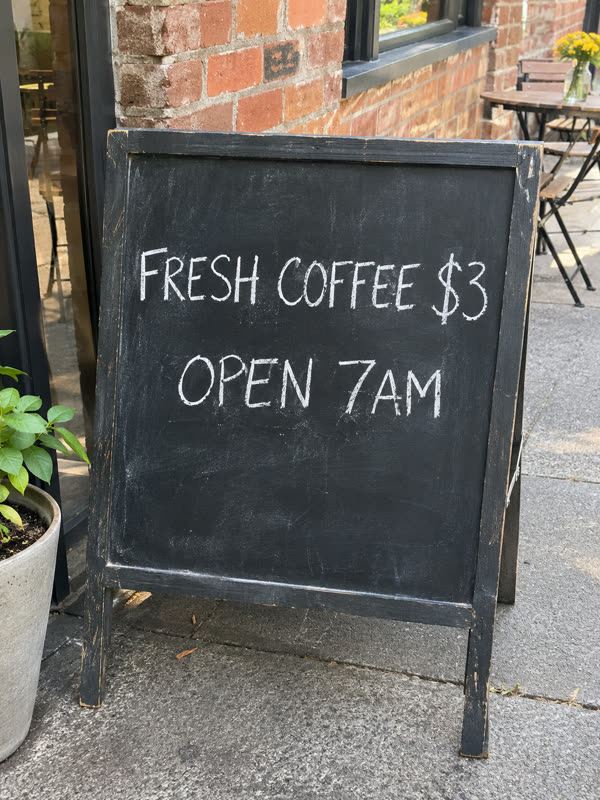
"FRESH COFFEE $3" and "OPEN 7AM" erased from a café sign. The chalk smudges, the wooden frame and the street behind stay as they were.

 BeforeAfter
Or replace the text instead
When the space should hold new words rather than none, the editor rewrites the text in the same lettering: "50% OFF EVERYTHING" became "30% OFF DRESSES".
 BeforeAfter
Or translate it
The same poster with every line in Spanish, in place: "OFERTA DE VERANO, 50% DE DESCUENTO EN TODO".
The test photos were made with an AI image model for this page, so you can see a clean before and after. The results are single, unretouched edits from gpt-image-2, the model the editor uses. Text over a busy pattern or a face is harder to fill than text on a plain surface.
Four steps
How to remove text from an image
- 01
Upload the image
A JPG, PNG or WebP up to 10 MB: a photo with a caption, a screenshot, a product shot with a sticker, a scan with a date stamp.
- 02
Choose what to remove
All text takes every word off the image. Only some takes off just the words you list, one per line, up to five, and leaves the rest of the text as it is.
- 03
Press Remove text
Sign in when you press it, and your image and choices wait for you. Your first edit is free; after that an edit is 125 credits ($0.50). In our tests an edit took 30 to 80 seconds.
- 04
Compare and download
Drag across the result to see what was removed, check the filled area, and download the image at the size you uploaded it. It stays in My edits.
Clean pictures, fast
When people remove text from an image
Text that was right for one use is often wrong for the next. These are the clean-ups people ask for most.
- 01
Reuse a product photo without its sticker
Take a price tag, a "NEW" badge or a promo sticker off a product shot so the same photo works in a listing, a catalog or a new campaign.
- 02
Clear a template or a sign for new words
Empty a chalkboard, a poster, a banner or a card so you can set your own text on it in a design tool, or with the editor's Edit mode.
- 03
Take a date stamp or caption off a photo
Old camera date stamps, burned-in captions and labels added by an app: remove them and keep the picture.
- 04
Clean up a screenshot before you share it
Remove a name, a handle or a notification from a screenshot before it goes into a slide, a guide or a post.
- 05
Remove your own watermark from an old export
When you have only the watermarked copy of your own image, remove the mark instead of recreating the picture. Only do this with images you own or have the right to edit.
- 06
Replace or translate instead
If the space needs different words rather than none, use Edit or Translate in the same editor: the new text is set in the same lettering.
For a clean fill
Tips to remove text from an image cleanly
- 01
List the text when only some should go
Choose Only some and type the words exactly as they appear. Everything you do not list stays, so a logo or a heading you want to keep is safe.
- 02
Plain backgrounds fill best
Text on a wall, a board, the sky or a solid color is filled in very cleanly. Text across a face, a detailed pattern or other text is harder, and the fill may not match exactly.
- 03
Use the largest copy you have
A sharp, full-size image gives the model more of the surface around the text to copy from. The result keeps your image's size.
- 04
Look closely at the filled area
Zoom into where the text was before you use the image. If a trace remains, run the edit again on the result. A failed edit returns its credits.
One-time, no subscription
Remove text from image: first edit free, then $0.50
Every account gets one free edit. After that, each edit is 125 credits, which is $0.50, and a one-time $5 purchase adds 1,250 credits: ten edits.
- First edit free for every account, no card needed
- 125 credits ($0.50) for each edit after that
- $5 one-time for 1,250 credits: ten edits, no subscription
- Credits come back when an edit is confirmed failed
Remove text from image: questions and answers
How do I remove text from an image for free?
Every account gets one free edit. Upload the image, choose All text or list the words to remove, and press Remove text; you sign in at that point, with no card needed. After the free edit, each one costs 125 credits ($0.50), bought as a one-time $5 pack of ten.
Can I remove only part of the text from an image?
Yes. Choose Only some and type each piece of text to remove on its own line, up to five. Text you do not list stays where it is, so you can take a caption off and keep the brand name.
What fills the space after I remove text from an image?
The model fills it with what was around the text: the wall, the board, the sky, the fabric or the pattern, with its lighting and texture. The rest of the picture is kept as it was, at the same pixel size.
Will removing text from a photo change anything else?
It is told to keep the people, objects, colors, lighting and framing exactly as they are. Fine details right next to the removed text can still shift slightly, so compare before and after with the slider.
Can I remove a watermark from an image?
Only from an image you own or have the right to edit, such as your own export. Removing someone else's watermark to use their picture can infringe their copyright, and our terms do not allow it.
Which images work best to remove text from?
Sharp JPG, PNG or WebP images up to 10 MB with text on a fairly plain surface: signs, boards, posters, packaging, screenshots and photos with captions. Text over faces or busy patterns is the hardest to fill.
How long does it take to remove text from an image?
In our tests an edit took 30 to 80 seconds. The result appears when it is ready, and it is saved in My edits, so you can close the page while it works.
What if some text is still there after the edit?
Run the edit again on the result, or list the remaining words with Only some. An edit that fails returns its credits, and a failed free edit can be tried again; an edit that finishes with a trace left still counts.
Do you keep or train on my images?
Your images and results are kept at long, unguessable addresses so you can come back to them, and they are never used to train AI models. Write to contact@editphototextai.com and we delete them within 30 days.
Same editor, other jobs
Other ways to change the text in an image
- Edit text in photoReplace the words on a sign, poster or screenshot and keep the original font, color and size.
- Translate text in imagePut the words on a poster, label or menu into one of 20 languages, in place and in a similar font.
 Photo text editorEdit, remove and translate in one place: what the editor can do, what it costs and where it falls short.