
Edit, remove, translate
Photo Text Editor That Keeps the Font
This photo text editor changes the words already in a photo: type the old text and the new, and AI sets the new words in a matching font, color and size. It also removes text and translates it into 20 languages. Your first edit is free; after that an edit is $0.50.
Change the words, keep the photo
First edit free · then $0.50 an edit · no subscription
Upload a photo with text on it to start, or try the sample poster.
Each edit: 125 credits ($0.50) · first edit free · $5 buys 10, no subscription
Example: "50% OFF EVERYTHING" → "30% OFF DRESSES"
Real result · drag to compare
 BeforeAfter
Three modes, one editor
What this photo text editor does
Most photo editors add new text on top of a picture. This one works on the text that is already part of it, which is what you need when the words are printed on a sign, a package or a poster in the photo.
- 01
Edit: replace words in the same lettering
Type each piece of text as it appears and what it should say, up to five per edit. The new words take the font, weight, color, size, position and texture of the old ones; everything else stays.
- 02
Remove: erase text and fill the background
Take every word off the photo, or only the ones you list. The space is filled with the surface around it, so the photo looks as if the text was never there.
- 03
Translate: the same design in another language
Pick one of 20 languages and every line is rewritten in place in a similar font. Brand names, numbers and prices are kept.
- 04
Every result at your photo's size
The edited photo has the same pixel size as the one you uploaded, so it drops back into the listing, slide or post it came from. Drag across it to compare with the original.
Real results, not mock-ups
Photo text editor examples: before and after
Drag across each picture to compare. These are unretouched results from the model the editor uses, at the same size as the photo that went in.
 BeforeAfter
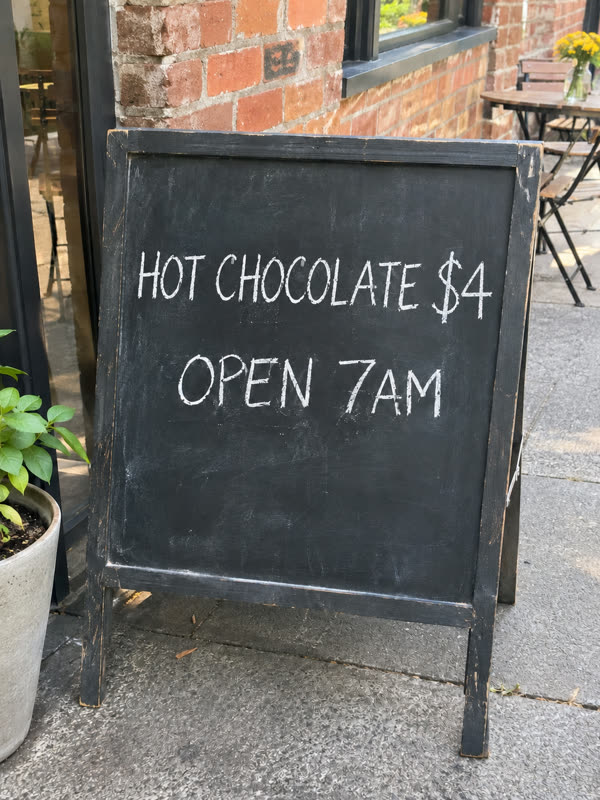
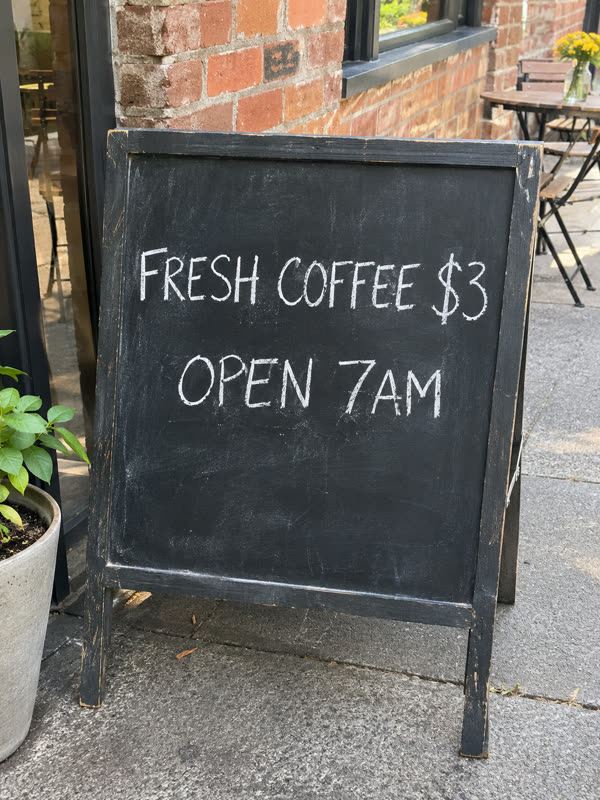
Edit: a chalkboard menu
"FRESH COFFEE $3" became "HOT CHOCOLATE $4" in the same hand-drawn chalk letters, and "OPEN 7AM" stayed as it was.
 BeforeAfter
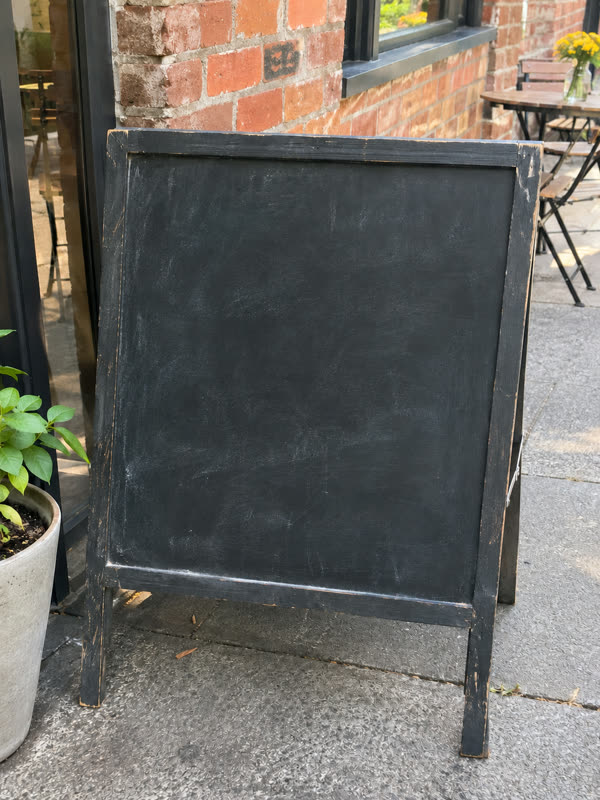
Remove: the same board, wiped
Every word erased, with the chalk smudges and the board's texture filled back in where the letters were.
 BeforeAfter
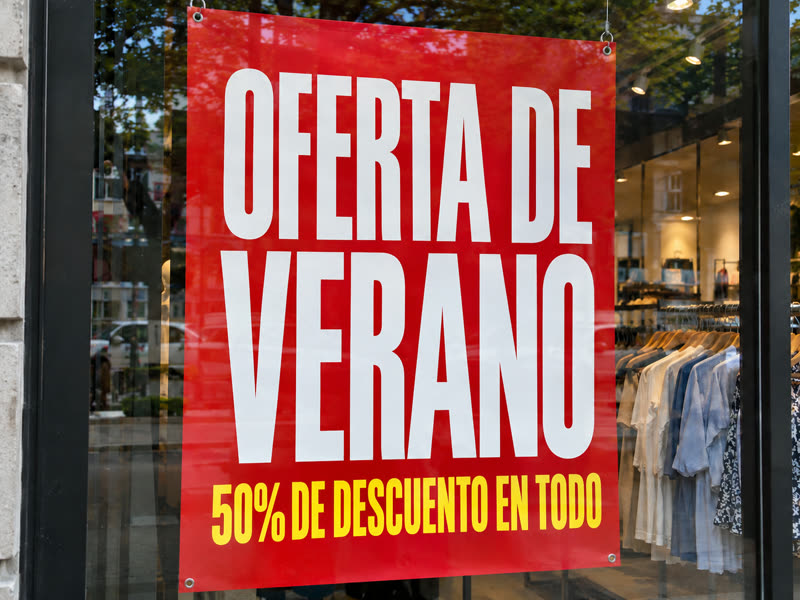
Translate: a poster in Spanish
"SUMMER SALE, 50% OFF EVERYTHING" became "OFERTA DE VERANO, 50% DE DESCUENTO EN TODO" in the same white and yellow capitals.
The test photos were made with an AI image model for this page, so you can see a clean before and after. The results are single, unretouched edits from gpt-image-2, the model the editor uses.
Against the usual way
Photo text editor or a layer-based editor?
Changing printed words in a photo by hand means removing the old text, rebuilding the background behind it, finding a matching font and setting the new text in the right perspective. Here is when each way fits.
- 01
Use this editor for a quick, faithful change
When you have only the flat photo and want a few words different in the same style, in about a minute, without layers, masks or fonts to find.
- 02
Use a design tool when you have the source file
If you still have the original design with its text layers, changing the text there is exact and free. This editor is for when the words are part of the picture.
- 03
Use a design tool for exact typography
When the font, the kerning and every letter must be precisely a brand's, set the text yourself. The AI matches the look closely but does not use the font file.
- 04
Combine them
Remove the old text here to get a clean background, then set your exact words on it in a design tool.
Four steps
How to use the photo text editor
- 01
Upload the photo
A JPG, PNG or WebP up to 10 MB with text on it: a sign, poster, label, menu, T-shirt, screenshot or meme.
- 02
Choose Edit, Remove or Translate
Then type the old and new text, list what to remove (or remove all), or pick the language.
- 03
Press the button
Sign in when you press it, and your photo and text wait for you. Your first edit is free; after that an edit is 125 credits ($0.50). In our tests an edit took 30 to 80 seconds.
- 04
Compare and download
Drag across the result to compare, read every word, and download the photo at its original size. Every edit stays in My edits.
Who it is for
Who uses a photo text editor
- 01
Shops and online sellers
Update prices and offers on product photos and banners, take stickers off packshots, and translate listing images for other markets.
- 02
Cafés, restaurants and venues
Change a dish or a price on a photo of the menu board, the hours on a door sign or the date on an event poster.
- 03
Designers and marketers
Show a client a headline on a billboard photo, or make language versions of a creative before anything is rebuilt.
- 04
Anyone with a typo in an image
Fix a misspelled word in a flyer, an invitation or a social image you only have as a picture.
Honest limits
Where this photo text editor falls short
- 01
Tiny or blurry text
Small print, heavy blur or text at a steep angle is harder to read and to match; nearby small text can change too.
- 02
A misspelled word now and then
AI image models can get a letter wrong. Read the result; edit it again to fix a word. A failed edit returns its credits.
- 03
One photo at a time
Each edit works on one photo and up to five pieces of text. Batch editing many photos at once is not available.
- 04
Not for documents meant as proof
Do not edit IDs, receipts, certificates or contracts, or photos you have no right to change; the terms forbid it.
One-time, no subscription
Photo text editor pricing: first edit free, then $0.50
Every account gets one free edit. After that, each edit is 125 credits, which is $0.50, and a one-time $5 purchase adds 1,250 credits: ten edits.
- First edit free for every account, no card needed
- 125 credits ($0.50) for each edit after that, in any mode
- $5 one-time for 1,250 credits: ten edits, no subscription
- Credits come back when an edit is confirmed failed
Photo text editor: questions and answers
What is a photo text editor?
A tool that changes the text that is already in a photo, rather than adding new text on top. This one replaces words in the same lettering, removes text and fills the background, or translates the text into another language, using AI.
Is this photo text editor free?
Your first edit is free, with no card needed; you sign in when you press the button. After that each edit is 125 credits ($0.50), bought as a one-time $5 pack of ten. There is no subscription.
Can the photo text editor match the font in my photo?
It matches the look: font style, weight, color, size, position, perspective and texture, including handwriting and chalk. It does not tell you the font's name or use a font file, so for a brand's exact typography set the text in a design tool.
Does the photo text editor change the rest of my photo?
It is told to keep everything except the text you ask about: people, objects, colors, lighting and framing. The result has your photo's pixel size. Details right next to the edited text can shift slightly, so compare with the slider.
How many words can I change with the photo text editor?
Up to five pieces of text per edit, each a phrase or line of up to 120 characters. Remove mode can take all text off at once, and Translate mode translates every line.
Which file types does the photo text editor take?
JPG, PNG and WebP up to 10 MB. You get back the edited photo at the same size, ready to download.
How long does an edit take?
In our tests an edit took 30 to 80 seconds. You can leave the page; the result is saved in My edits.
Is there an app?
No app to install: the editor runs in the browser on a phone or a computer. Sign-in and payment go through FloatPass, so you do not create a separate password here.
Are my photos used to train AI?
No. Your photos and results are kept at long, unguessable addresses so you can come back to them, and never used for training. Write to contact@editphototextai.com and we delete them within 30 days.
Start with one job
Edit, remove or translate the text in a photo
- Edit text in photoReplace the words on a sign, poster or screenshot and keep the original font, color and size.
- Remove text from imageTake captions, dates, stickers or your own watermark off a picture and fill the space with the background.
- Translate text in imagePut the words on a poster, label or menu into one of 20 languages, in place and in a similar font.